Frequently Asked Questions (FAQ)
Here you will find answers to the most frequently asked questions about the Gittel Mobile Station.
The serial number is located on the right side of the station on a silver sticker or on the back of the box (for GMS Lite, Basic, MAX), e.g. 26GMS123456.
The BMV is the battery monitor – a small round display installed either on the tabletop or on the front of the GMS Box. The battery charge level is displayed here. Switching is possible using the + or – button.
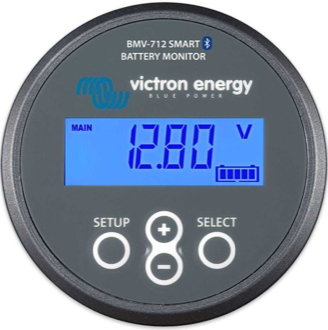
| Display | Unit | Meaning |
|---|---|---|
| % | Percent | Current battery charge level |
| Ah | Ampere-hours | Power consumed since 100% charge |
| W | Watt | Current total power consumption of all connected devices |
| A | Amperes | Current discharging current |
| V (main) | Volt | Current battery voltage – possible defect below 10.5 V |
| H | Hours | Remaining runtime with the current power consumers (this can vary significantly for printers) |
If lithium batteries are installed in the station, the model designation is followed by LiFe (e.g. GMS 1600 LiFe). In exceptional cases – e.g. when retrofitting or upgrading an older station – the label may be missing.
An upgrade is possible for all stations from 2017 onward. For a quote or more information, please have the station’s serial number ready and contact us.
If the station still has enough space for additional options, upgrades or modifications are possible at any time – in most cases even configurable with an image directly via the respective configurator.
For an exact description or ideas, simply take a look in the respective configurator and then contact us via the Service form.
Due to the limited dimensions in the GMS Box, the use of a laser printer in the GMS Lite and GMS Basic is not possible. Laser printer operation is generally not possible with the GMS 500; however, this station can be easily upgraded for laser printer operation.
For an upgrade, please use the Service form use.
Customizing the installed IT hardware is not a problem as long as the peak load of the respective model is not exceeded. Please note that this may also change the runtime.
For a different printer, please check whether it is a laser printer and whether its use is possible with the respective model.
If you have any questions, we are available by phone: 0711 / 550370-0.
A submission for general inspection is not a problem. Please note that we charge a inspection fee plus shipping costs for this.
Please notify us of the shipment in advance via the Service form or by email to. Delivery is generally possible on weekdays between 8 a.m. and 4 p.m. at Voltastraße 2, Stuttgart
The station must be secured while standing on a sufficiently large pallet:
- Lock the wheels from the front and side to prevent rolling
- Secure the station to the pallet with strapping bands / tensioning straps
- Wrap with stretch film; use red and white adhesive tape on all corners and edges
Alternatively, the station can be supported on a pallet with wooden blocks. Please note: Attachments must not extend beyond the pallet. For delivery directly into our building, a pallet is not strictly necessary.
IMPORTANT: These are shipping recommendations only. We do not assume any liability or claims for transport damage.
Please register the station in advance via our Service form on.
Nearly every electrical device consumes a small amount of power even when switched off. In addition, every battery has a self-discharge rate. These two factors can cause the battery to deep discharge when it is not plugged in.
- Lead-gel batteries can be damaged after the first deep discharge.
- Lithium batteries in this case usually only require a longer charging period or, in the worst case, an external charge controller.
Note: Damage caused by deep discharge is not covered under warranty at any time.
With professional battery testers, we can test stations very extensively in-house and, if necessary, repeat test runs multiple times. These tests often only need to be initiated and then run for up to 24–48 hours – during that time, a technician at your site would have nothing else to do.
In addition, we have all possible spare parts readily available. If further defects are identified, we can also remedy them directly upon request (e.g., casters, charging cables).
The beeping can be stopped by simply pressing a button on the battery monitor (BMV). This is a low battery voltage alarm.
This occurs with:
- Lead Gel: 50% charge state
- Lithium: 30% charge level
The station should then be connected to the power supply as soon as possible.
Please check the following points one by one:
1. Does the BMV (battery monitor) display anything?
If a lead-gel battery was discharged below 40% or a lithium battery below 20%, the station is only ready for mobile use again once it has reached a minimum charge of 95% (lead-gel) or 21% (lithium), respectively.
- Yes → lead-gel min. 95% / lithium min. 21% – otherwise plug in the station for 24–48 h
- No → The station will likely need to be sent in (from Q3 2025: use an external charger) – Get in touch
2. Does the station work when it is plugged into the mains?
- Yes → check further points
- No → Connect the station to the power supply for at least 24–48 h; if mobile operation is still not possible: Get in touch
3. Check the ON/OFF main switch (bottom right on the station)
- ON → mobile work, work on mains power, and charging possible
- OFF → only operation on mains power and charging possible
GMS BOX: Toggle switch on the front.
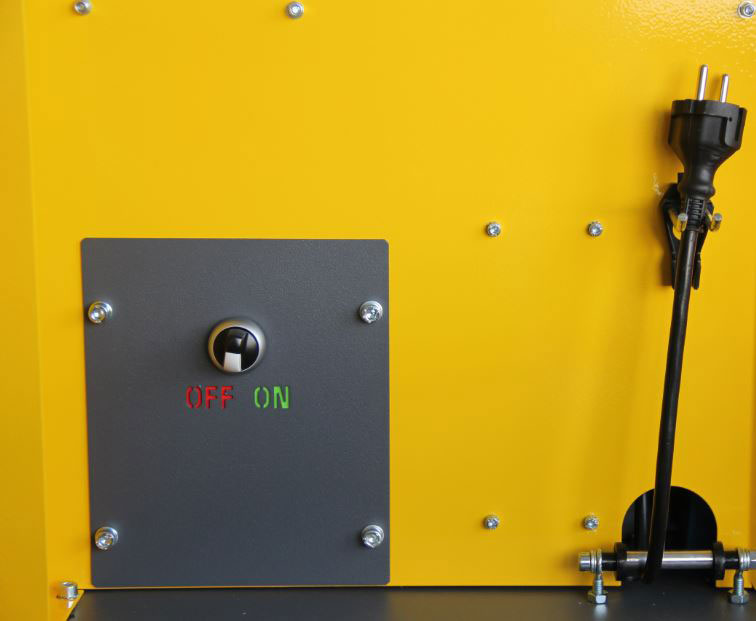
3.1. ON/OFF switch from 2026 (Toggle switch under the tabletop, right side)
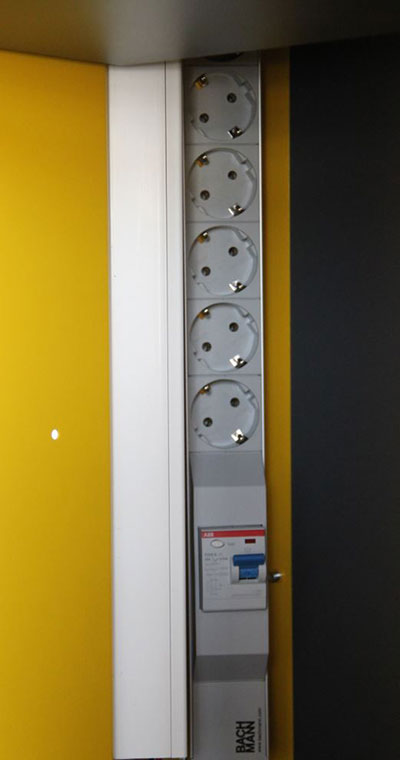
4. Check the power strip
The GFCI switch (blue rocker switch) must be set to RED to supply power. Use the small test button to the left of it to check whether power is reaching it:
- Switch trips down and shows green → power strip supplies no power
- Nothing happens → power strip is OK
GMS BOX: RCD switch is located on the rear side.
For stations manufactured from 2025 onward, the wheels can be replaced independently.
Please first check when the problem occurs:
- When starting a print job: The printer may require too much power – the station shuts down, the printer stops, and the station turns back on. If this happens even though the printer has not changed, the battery is likely defective.
- During normal operation: The battery is probably defective.
In both cases, please contact us via the Service form to us.
Please call us at +49 711 550370 – 14 once the station has been plugged in for at least 24–48 hours, without using it beforehand.
The issue is likely defective batteries. The station should be sent to us for inspection. Please contact us via the Service form.
If the voltage display in the BMV drops quickly below 12.8 V after unplugging, the battery may be defective. In this case, the battery should be replaced by authorized qualified personnel.
With an all-in maintenance contract, a replacement is free of charge.

Voltastr. 2-6
70376 Stuttgart
Deutschland
Tel: +49 (0) 711 / 55 03 70-0
Fax: +49 (0) 711 / 55 03 70-18
info@gittel-it.de
Printer and network support
Mo – Fr von 8:30 bis 18 Uhr
+49 (0) 711 / 55 03 70 14

